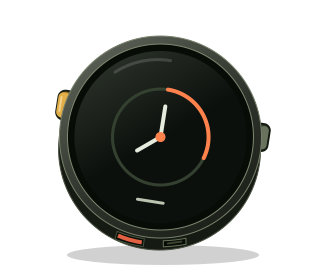
The assignment
Build the first LVGL interface for the M5Stack Stopwatch.
Make a counter, a brightness slider, an Orange mode switch, and an About screen. Give touch and the two physical buttons access to the same behavior, preserve state while navigating, and consume the calibration map saved by Day 07.
The durable lesson source is the behavior contract, the testing model, and the build prompt below. Three disposable state-core implementations pass the same 140,147 assertions.
The interface
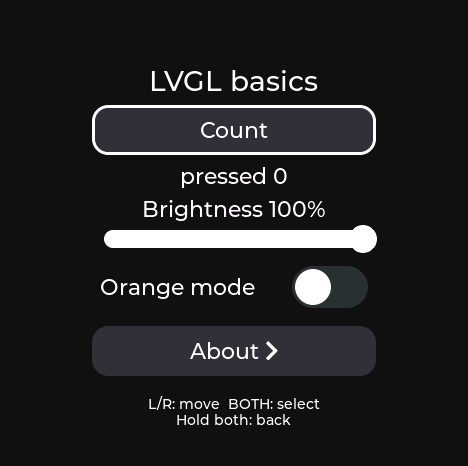
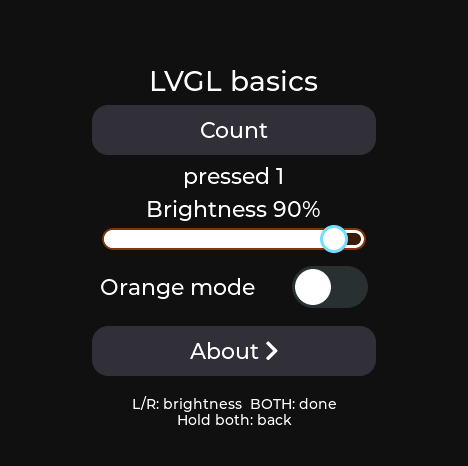
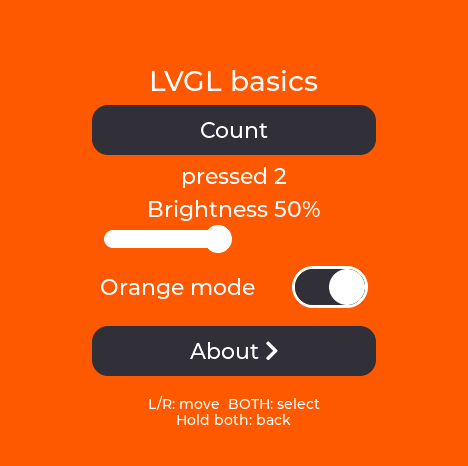
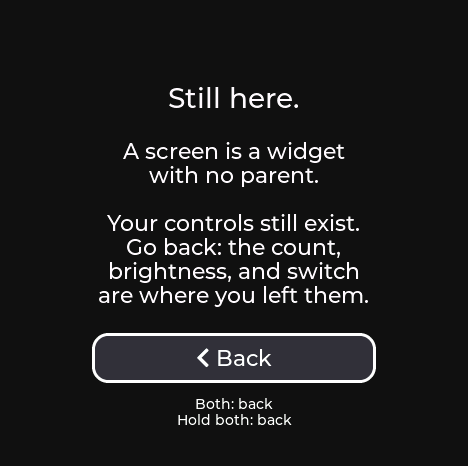
These framebuffer captures came from the automated run on the attached Stopwatch.
| Controls | Button editing |
|---|---|
 |  |
| Orange mode | About |
 |  |
The build prompt
Copy this prompt into a coding agent at the ESPtember repository root.
Build ESPtember Day 08: LVGL Basics for the M5Stack Stopwatch Dev Kit (C152).

Read these sources before writing code:
- .agents/skills/build-stopwatch-lessons/SKILL.md
- days/day-07-touch-calibration/SPEC.md
- days/day-08-lvgl-basics/SPEC.md

Implement the exact lvgl_basics_core.h API from Day 08's contract.
Run days/day-08-lvgl-basics/tests/run-candidate.sh against the implementation.
Run Day 07's contract suite against the copied touch-calibration core.
Do not edit either test suite to make the candidate pass.

Use:
- Arduino ESP32 core 3.3.10
- M5Unified 0.2.19
- M5GFX 0.2.26
- LVGL 9.3.0

Hardware setup

- Target board_M5StopWatch on ESP32-S3 with OPI PSRAM enabled.
- Hold it with the lanyard loop at the bottom.
- BtnA is physical left. BtnB is physical right.
- Immediately after M5.begin(), set panel width 468, height 466,
  offset_x 6, offset_y 0, then rotation 0.
- Create LVGL only after correcting that geometry.
- Allocate the full retained RGB565 capture frame in PSRAM and a bounded partial
  LVGL draw buffer in internal memory.
- Never render rows 466 or 467. Bright screens must have no bottom black bar.
- Fail visibly and over serial if board identity, touch, geometry, PSRAM, or a
  required allocation is unavailable.

Load calibrated touch before LVGL

- Open Preferences namespace espt-touch and read blob record without modifying it.
- Accept the 40-byte Day 07 version-1 affine record and the 440-byte version-2
  affine-plus-local-warp record.
- Validate byte count, metadata, geometry, rotation, checksum, finite values,
  affine determinant, residual magnitudes, and neighboring residual deltas.
- Report the loaded version and generation over serial.
- If version 1 loads, apply it as an affine map with zero residuals.
- For every physical touch, call M5.Display.getTouchRaw(), apply the complete
  shared map, then clamp to 0..467 and 0..465 before giving the point to LVGL.
- Do not use M5.Touch converted x/y as the LVGL pointer and do not add any
  Day 08 offset, swap, scale, or calibration constant.
- If no valid record exists, enter the shared Day 07 guided calibration flow.
  A 600 ms two-button hold during boot also enters it. Commit returns to LVGL
  with the new map active; cancel retains the prior map.

Build the interface

Create two persistent LVGL screens.

The Controls screen contains, from top to bottom:
- title: LVGL basics,
- Count button and pressed-count readout,
- Brightness label and slider,
- Orange mode label and switch on one row,
- About button.

Use the exact interactive bounds and round-face checks in SPEC.md.
Everything fits without scrolling.
Draw focus decoration inward so no parent clips it.
Use a white inset border for Count, Orange mode, and About.
The white slider uses an orange inset knob ring while focused and blue while
button editing is active.

Count begins at 0 and increments once per activation.
Brightness spans 10–100 percent and applies immediately through M5GFX using
(percent * 255 + 50) / 100.
The 10 percent floor keeps the interface visible.
Orange mode changes the screen background between #101014 and #ff5b04 while
interactive controls retain enough contrast.

The About screen says:

Still here.

A screen is a widget
with no parent.

Your controls still exist.
Go back: the count,
brightness, and switch
are where you left them.

It contains one Back button.
Animate Controls to About left and About to Controls right over 250 ms.
Keep both screens alive so all state survives navigation.

Physical controls

Use the C25K recognizer unchanged:
- left / BtnA click: previous control; decrease brightness by 10 while editing,
- right / BtnB click: next control; increase brightness by 10 while editing,
- short two-button chord: activate; enter or finish brightness editing,
- 600 ms two-button hold: leave editing, return from About, or focus Count.

Focus wraps Count -> Brightness -> Orange -> About.
A chord joins within 80 ms, overlaps at least 80 ms, waits for release, consumes
both individual clicks, and never emits Enter after Escape.
Single-button holds do nothing.

Touch behavior

Touch and buttons dispatch the same state actions and LVGL events.
Tap Count to increment once.
Drag Brightness for immediate value and panel updates.
Tap Orange mode to toggle.
Tap About and Back to navigate while preserving values.
Touching a widget moves focus to it without entering button-edit mode.

Diagnostics and generated-device tests

Prefix protocol lines with D08_.
Provide status, reset, tap, drag, button, capture, and touchlog commands exactly
as SPEC.md describes.
Keep injected pointer and button devices separate from physical inputs, but route
them through the same LVGL hit testing, callbacks, state reducer, and button grammar.

Retain the pixels passed to M5GFX and stream capture rows in bounded chunks.
Logging and capture must not block button polling, LVGL timers, or the watchdog.

The instrumented run must prove:
- every focus and edit state is visible and unclipped,
- Count increments once per action,
- brightness reaches 10 and 100 plus an intermediate value,
- Orange mode toggles both ways,
- values survive About and Back,
- physical-button semantics match injected semantics,
- 20 navigation round trips complete without reset or growing memory use,
- the active touch map version and generation remain unchanged,
- and app-only installation preserves espt-touch/record.

Then flash the attached device as an app update, not a merged fresh install.
Physically confirm finger alignment at all controls, left/right button direction,
chord feel, brightness, focus rings, the lower display edge, and the absence of
a black bar.

Record observed results without treating injected input as physical proof.
What the lesson teaches
LVGL owns a tree of widgets and delivers events to them. The display adapter moves rendered pixels to M5GFX. The input adapter moves the device’s calibrated screen coordinates into LVGL.
That boundary matters. Day 08 can teach widgets because Day 07 already learned where the finger landed.
Recorded evidence
The prompt’s portable reducer passes 140,147 assertions in three independent implementations. They agree on state transitions, touch behavior, brightness limits, state validity, deterministic long sequences, and round-face bounds.
The earlier Stopwatch port compiled and passed injected LVGL, button, capture, and 20-round-trip checks before the shared local warp existed. Its physical layout work established the 468 × 466 correction and inset focus borders.
The attached device holds a validated Day 07 version-2 generation-2 map.
A regenerated Day 08 candidate loaded that exact runtime map after an app-only install and reported it through D08_STATUS.
The automated device harness passed, including Count, brightness, Orange mode, About and Back, button editing, captures, and 20 navigation round trips.
Heap stayed at 277,968 bytes, PSRAM stayed at 7,499,828 bytes, and the active map remained version 2 generation 2 throughout the run.
The remaining evidence is deliberately human: physical finger alignment across the round face, especially the lower controls; BtnA/BtnB direction and chord feel; focus-ring clipping; perceived brightness; and the absence of a bottom black bar.