The assignment
Build a pocket drum machine with four colored pads per page. Touch a pad and it sounds immediately. Use the left and right pushers to move between pages.
The board has eight slots grouped as two complete game kits. The Mario page has Jump, Coin, Death, and Power Up. The Asteroid page has Shoot, Explode, Crash, and its own Power Up. The page name sits above the pads so every sound has a clear context.
The durable source is this prompt, SPEC.md, the machine-readable contract, and its layered acceptance criteria. Generated firmware is a disposable candidate.
Reference frame
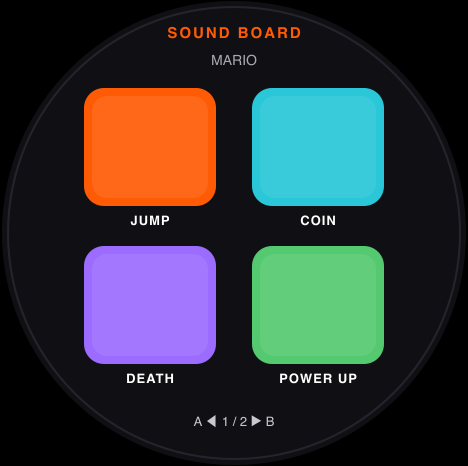
This deterministic reference defines the 2 × 2 pad grid, small labels, pager arrows, colors, and round-screen spacing. It is visual intent rather than device proof.
Device framebuffers
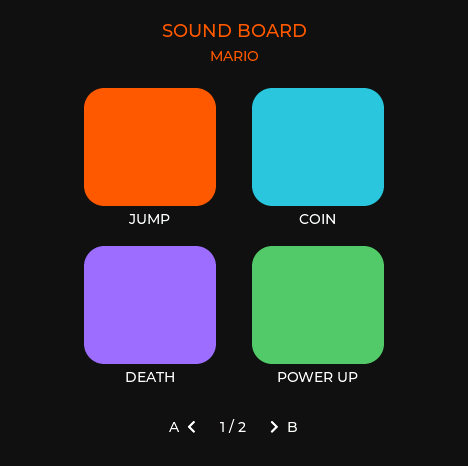
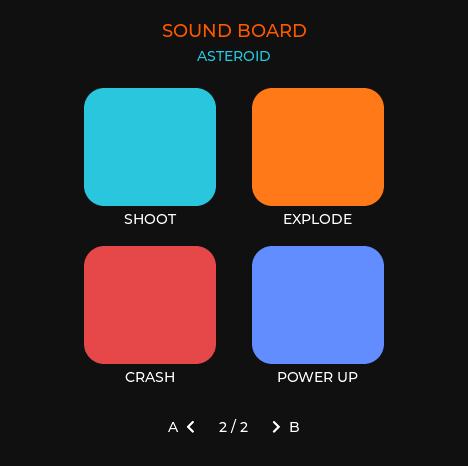
These are retained RGB565 frames from the generated candidate loaded on the attached Stopwatch. They establish actual LVGL layout at 468 × 466. They do not establish perceived sound quality, physical pusher feel, or physical touch accuracy.
How the generated sounds work
A generated effect is a short signed 16-bit mono PCM buffer at 22,050 Hz. The build turns a description into explicit numbers, then renders the whole buffer into PSRAM before the pads become active.
The defaults use:
- Mario · Jump: a rising 220 Hz to 1,220 Hz sine sweep with a rounded envelope.
- Mario · Coin: two square-wave notes, 988 Hz then 1,319 Hz.
- Mario · Death: four descending square-wave notes with an exponential fade.
- Mario · Power Up: a bright rising four-note triangle-wave arpeggio.
- Asteroid · Shoot: a short 1,600 Hz to 420 Hz electronic shot with a noise click.
- Asteroid · Explode: explicitly seeded noise through a one-pole low-pass filter and exponential decay.
- Asteroid · Crash: a seeded metallic noise burst layered with a falling low tone.
- Asteroid · Power Up: a rising 180 Hz to 1,380 Hz sine sweep with amplitude modulation.
The recipe is deterministic. The same settings produce the same PCM hash on every build. Noise always declares its seed.
The previous version rendered a sound after the tap and waited for the current clip before playing the queued one. This version prepares all audio at startup, triggers on touch-down, and immediately retriggers the single voice with the newest pad. There is no synthesis, file decoding, allocation, animation, or release wait on the trigger path.
Configure your pads
Tell the building agent which slot to replace and give it either a description or a file. You may also choose the label and pad color.
A description can be ordinary language:
Replace page 2, pad 3 with a deep electronic kick.
Start near 150 Hz, fall to 55 Hz over 220 ms, add a very short noise click,
and use a dark red pad labeled KICK.
The generated project must translate that request into a visible recipe with waveform, frequencies, duration, envelope, filters, modulation, noise seed, and gain. Edit those concrete values after listening if you want finer control.
For a recorded sound, attach the file and name its slot:
Put clap.flac on page 2, pad 4.
Label it CLAP and use #9b6cff.
Trim it to at most two seconds, but do not change its pitch.
The build keeps the original and creates a reproducible mono 22,050 Hz signed 16-bit PCM derivative. A typical conversion is:
ffmpeg -i clap.flac -ac 1 -ar 22050 -c:a pcm_s16le clap-22050-mono.wavWAV, AIFF, MP3, FLAC, and OGG inputs are accepted at build time. Compressed files are never decoded when a pad is touched.
The build prompt
Build ESPtember Day 09: Sound Effects Board for the M5Stack Stopwatch Dev Kit (C152).

Read these before writing code:
- .agents/skills/build-stopwatch-lessons/SKILL.md
- .agents/skills/prompt-first-embedded-lessons/SKILL.md
- days/day-07-touch-calibration/SPEC.md
- days/day-09-sound-effects/SPEC.md
- days/day-09-sound-effects/tests/contract.json

Treat the prompt, spec, tests, and acceptance criteria as source.
Put deterministic behavior in a portable core and keep Arduino, LVGL, M5Unified, storage, audio, and touch adapters outside it.
Run scripts/prompt-contract/validate_day.sh days/day-09-sound-effects before compiling a device candidate.
Do not edit the contract or tests to make a candidate pass.

Hardware and shared platform

- Target board_M5StopWatch on ESP32-S3 with OPI PSRAM.
- Hold the device with the lanyard loop at the bottom: BtnA is physical left and BtnB is physical right.
- Immediately after M5.begin(), set panel width 468, height 466, offset_x 6, offset_y 0, then rotation 0.
- Never draw rows 466 or 467. Keep all content inside the radius-226 round safe area.
- Load Preferences namespace espt-touch, blob key record, after display setup and before touch input.
- Accept and validate Day 07 version 1 and version 2 records. Read raw touch, apply the complete shared warp, clamp once, then feed the mapped point to LVGL.
- Holding both pushers for 600 ms during boot enters the shared calibration flow. App-only installation preserves the record.
- Allocate retained frames and PCM buffers in PSRAM; fail visibly and over serial when required hardware or memory is unavailable.

Localized controls and layout

- This lesson uses a drum-machine exception to the C25K grammar.
- BtnA/left shows the previous page. BtnB/right shows the next page. Pages wrap; with two pages either pusher toggles the page in its direction.
- Touching a pad triggers it on LV_EVENT_PRESSED. Do not wait for release and do not require a chord.
- Ignore simultaneous runtime pusher edges so two page changes cannot cancel each other accidentally.
- Show four 132 × 118 colored squares in a 2 × 2 grid at the exact bounds in contract.json.
- Put each short pad label in small text directly underneath its square. Do not put large text or icons inside a pad.
- Show A with a left pager arrow, the page count, and a right pager arrow with B at the bottom.
- Name the active kit above the grid: MARIO on page 1 and ASTEROID on page 2.
- Page 1 contains Jump, Coin, Death, and Power Up. Page 2 contains Shoot, Explode, Crash, and a distinct Power Up.

Sound configuration

- Create one manifest with at most eight ordered slots. Each slot has a short label, pad color, and either a natural-language description or a supplied audio file.
- For a description, preserve the text and emit an editable deterministic recipe containing waveform/noise type, frequencies, duration, envelope, optional filter/modulation, explicit noise seed, and gain.
- Render described recipes to signed 16-bit mono PCM at 22,050 Hz before enabling input.
- For a WAV, AIFF, MP3, FLAC, or OGG input, preserve the original and reproducibly convert it before compilation to 22,050 Hz mono PCM signed 16-bit little-endian.
- Reject unreadable, silent, longer-than-two-second, or over-budget clips and disable only the affected slot.
- Domain-test every configured clip for deterministic hash, sample bounds, duration, non-silence, and total PSRAM budget.

Fast trigger path

- Prepare and retain every final PCM buffer before the UI becomes interactive.
- A pad press resolves its slot, updates state, and immediately stop/retriggers speaker channel 0 from the resident buffer.
- The newest press replaces the current sound immediately. Keep no pending queue.
- Repeated presses of one pad restart it from the first sample.
- Perform no synthesis, decoding, file I/O, allocation, long logging, animation wait, or release detection on the pad callback.
- Page state changes within 16 ms. Over 100 injected pad presses, pad-to-D09_AUDIO-started p95 is at most 30 ms and no trigger exceeds 50 ms.

Diagnostics and acceptance

- Prefix serial protocol lines with D09_ and implement status, reset, action, capture, touchlog, and calibrate commands.
- Report hardware identity, corrected geometry, touch-map version and generation, page, active clip, last trigger, play count, memory headroom, stack headroom, and last named error.
- Log slot, source type, sample count, PCM hash, request time, start time, and measured latency for each trigger without printing PCM on the trigger path.
- Injected actions use the same reducer, hit testing, callbacks, page handler, and audio trigger as physical input.
- Retain the exact RGB565 pixels sent to M5GFX and stream captures in bounded chunks.
- Run contract.json, domain tests, deliberate mutation rejection, 100-trigger latency measurement, immediate retrigger checks, and 20 page round trips.
- Confirm the active touch-map version and generation remain unchanged.
- Physically review pusher direction, pad responsiveness, every configured sound, touch alignment, clipping, lower-edge use, and the absence of a black bar.

Record host, compile, injected-device, and physical evidence separately.
Never describe reference rendering or injected input as physical proof.
Required behavior
- Four colored square pads per page, with short labels underneath and the active game kit named above them.
- BtnA pages left and BtnB pages right; the footer shows both pager arrows.
- Pads fire on touch-down and immediately retrigger one voice.
- The default Mario and Asteroid kits fill all eight slots; every slot still accepts a described recipe or supplied audio file.
- Audio is prepared before interaction and meets the measured latency limits in SPEC.md.
Recorded evidence
The revised shared contract validates Stopwatch geometry, calibration ownership, localized pager controls, both four-sound kit manifests, deterministic state, immediate retriggering, four round-safe pad bounds, and 10,000 generated actions against three disposable reducer shapes. A deliberately mutated reducer must fail.
The selected portable core passed 300,080 domain assertions, including deterministic PCM hashes and bounds for all eight generated sounds. The target build used 915,363 bytes of flash and 31,384 bytes of static RAM, then an application-only update preserved touch-map version 2, generation 2.
On the attached Stopwatch, all eight prepared PCM buffers occupied 149,498 bytes of PSRAM. The injected left and right pusher paths changed page state in 1,242 µs and 1,197 µs. Across 100 injected LVGL touch-downs, pad-to-speaker-start latency had a 329 µs median, 347 µs 95th percentile, and 542 µs maximum—well inside the 30 ms and 50 ms limits. Rapid Jump → Coin → Mario Power Up input replaced the active voice immediately, with starts measured at 1,223 µs, 426 µs, and 272 µs.
All eight configured paths started and completed, the Asteroid Crash and Power Up pads resolved independently, and 20 two-page round trips left free heap and PSRAM unchanged. The device is reset to page one for hand review. Perceived sound quality, physical pusher feel, and physical touch alignment still require direct observation.
Next exercise: Trap Looper
Keep the four-pad view, but turn it into a trap-oriented, four-measure 4/4 looper with 16 quarter notes total and independent Kick, Snare, automatic Hi-Hat, and Triple Hi-Hat tracks. The regular Hi-Hat is an ON/OFF eighth-note pulse, so the player does not need to tap every hat. Kick, Snare, and 3X Hi-Hat keep the automatic four-measure replacement gesture. An audible quarter-note click, with a higher beat-one accent, supplies the grid even before any drum track exists.
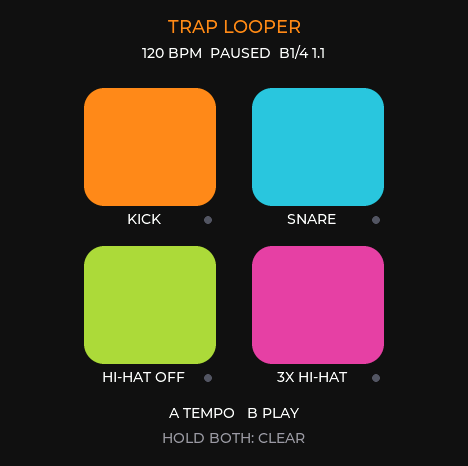
This framebuffer was captured from the generated device candidate after its injected-device checks, reset to an empty loop at 120 BPM.
The Trap Looper exercise specifies its 64-step loop, ON/OFF eighth-note Hi-Hat, tempo-locked three-stroke burst, per-track replacement rule, tap tempo, play/pause and clear controls, musical clock, tests, and hand review.
After that: Sampler + Voice Changer
Record one sound with the Stopwatch microphone, then use the same two-page pad layout to hear it as Clean, Chipmunk, Monster, Robot, Echo, Reverse, Stutter, and Alien.
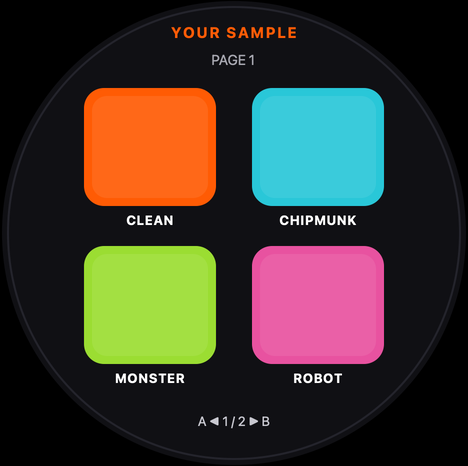
The Sampler + Voice Changer exercise specifies the complete recording flow, exact signal transforms, privacy boundary, performance limits, portable contract, and physical review. It keeps the existing Day 10 lineup intact while making the progression from generated sounds to recorded signal processing explicit.