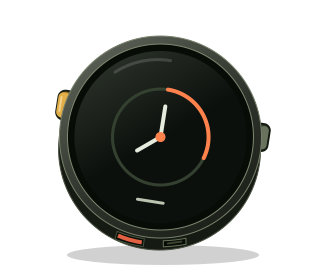
The prompt-first pass
The original build below records how this idea first worked. The durable lesson now targets the M5Stack Stopwatch and lives in the prompt, behavior contract, generalized tests, and hand-review checklist. Generated firmware is evidence for those sources, not the source itself.
This day took a detour from putting pictures on a screen. The assignment was a Couch-to-5K trainer for the M5Stack StopWatch: 27 workouts, two buttons, and a countdown you could read while moving.
The hardware and design spec were already chosen. The build could borrow the board setup from an earlier StopWatch project, then live on its own. No backend to bring along.
Two buttons, four gestures
Blue moves forward. Yellow moves back. Press both to enter; hold both to escape.
That grammar has to survive the way two fingers actually move. One arrives first. One lets go first. Sometimes a press turns into a hold.
The recognizer gives the second button 80 ms to join. Once a pair belongs to a gesture, its individual clicks are swallowed. A pair held for 600 ms produces Escape and stays consumed until both buttons are up.
The release is part of the gesture. It cannot be allowed to start the next one.
The portable button tests cover 98 assertions, including the timing thresholds, uneven releases, long single-button holds, and clock rollover. Those checks establish the rules; a run with the device in hand will establish how they feel.
Give the countdown the screen
The useful information fits in two lines: RUN and 30:00. Everything else supports them.
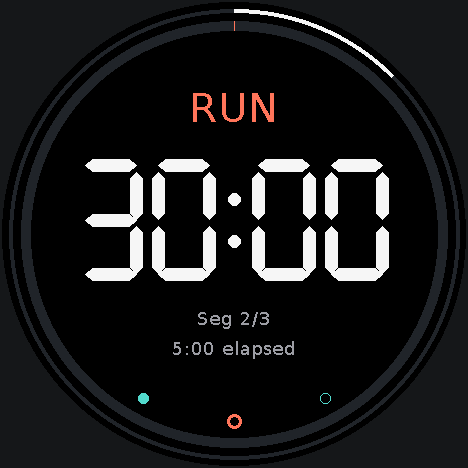
The countdown uses vector numerals with a true 122-pixel height. Even 30:00 fits inside the roughly 330-pixel square inscribed in the round display. The segment label is large enough to read before the smaller elapsed-time and segment-count lines.
Garmin’s design guidance helped focus the hierarchy, and Wear OS typography guidance reinforced the large, stable numerals. The final palette uses coral for running and aqua for walking, including warm-up and cool-down, with white and gray supporting text on black. Paused digits are dimmer but still readable in the captured frame.
The design spec allowed horizontal slide transitions. This version changes pages immediately so drawing leaves more time for button polling.
A replay still counts
Yellow follows the media-player convention: restart this segment, then step backwards with another press within two seconds. The session therefore needs to remember two things: position in the plan and time actually spent exercising.
Replay a run, and the progress ring moves back. The time already spent running stays in the log total. Pause, and both active-time counters stop.
The engine can consume a delayed update across multiple boundaries, attributing each piece of time to its segment. That made it possible to check every workout quickly using the same transition code that runs on the device. The accelerated checks used temporary progress in RAM, then restored the saved state.
The bugs around the timer
Cancel disappeared too quickly
Review caught a timestamp ordering problem in cancel confirmation. The main loop held an older timestamp; the button handler recorded a newer one when opening the overlay. Subtracting the newer value from the older unsigned value could look like an enormous elapsed interval and dismiss the overlay immediately.
Reading a fresh timestamp for the timeout check fixed the ordering. The device check then verified both explicit cancellation and the five-second automatic dismissal.
One partial looked like two sessions
The Home view counted a partial session in both the full-completion and partial-completion fields. That would display one complete and one partial after only one session.
The view now counts those categories separately. Repeats still stack, and the most recent completion date remains visible beneath them.
The screenshot lied about the colors
The first captures showed green rings and purple text. The framebuffer’s RGB565 bytes had been read through an overload that swapped them, then decoded in the opposite byte order.
An explicit pixel type fixed the capture path. Another capture check caught the end marker being dropped when the USB output buffer was full; the sender now waits for space on a later loop. Both fixes belonged to the inspection tool inside the firmware.
Check the machine, then take it outside
All 27 workouts completed under accelerated device checks with their expected durations and running totals. A real NVS save survived reboot, and Reset Progress removed the synthetic session afterward.
The separate real-time check ran for 125 seconds and crossed warm-up, running, and walking boundaries. It recorded exactly one minute of running. That established a short timing result, not a completed training session.
The device finished back on W1 D1, with the RTC set and the test history cleared. Outdoor readability, button feel, the perceived cues, and battery runtime remain checks for the first run.
What we learned
Two-button controls need explicit ownership from the first press through the last release. A held gesture must finish before another can begin.
Time and position deserve separate counters when people can pause, skip, or repeat. Keeping the timing engine independent of the display let the tests exercise those rules directly.
Even the inspection tools need checking. A screenshot’s colors can be wrong while the underlying framebuffer is right.
The result is a small device with one clear next action. Choose the day. Press both. Start moving.